Wednesday, April 24, 2013
FreedomPop Hotspot now only $40
Today they announced the updated model for only $40! I'll let you read the articles below as that will save me from having to explain everything to you. Essentially it is the same, $0 for 500mb 4G coverage. If you also want 3G coverage (to overlap the dead spots), it's $3.99/month.
Fierce Wireless
Cnet
Gigaom
Sacramento Bee
Techcrunch
For me, other than the original purchase price, I don't pay any recurring fees for the 500mb monthly allowance. When I dipped to less than 100mb left, I automatically got charged $10 to buy credit in case I overuse my monthly allowance. That credit never expires. If you turn off "Auto Top-Off" then you will never get charged the $10, but you will also only get to use 400 of the 500mb.
I currently have five friends that I connect with. Each of them give me an extra 50mb every month. So now every month we all each get a total of 750mb (500mb + 50mb + 50mb + 50mb + 50mb + 50mb). Towards the end of my month, if I have extra mbs that I know I will not use, I can give them to my friends in 20, 50 and 100mb increments. That way I can use up all the data instead of letting it go to waste.
So if you're still sitting on the fence, this is a real no-brainer. Once you get one, I can add your email to our sharing list and Boom! we'll all be up to 750mb just like that! Get another one for your kids and we'll get another 50mb! This is my definition of friends with benefits!
Sign up here: FreedomPop
Monday, February 25, 2013
Free 500mb data with FreedomPop
Two things I miss most about my prepaid plan are:
- Cannot buy $199 iPhone 5. I have to either buy a $649 unlocked version, or buy a used iPhone 4/4S for around $200
- No data plan. Hotspots are available at many places like McDonalds, Starbucks, library, City of Milpitas, JCPenney, but not when I need it: in my car, at the park, in a restaurant, etc.
To address problem number two, I ordered the FreedomPop Photon Hotspot.

For the last two weeks, I've been using the Photon for my daily commute and weekends. It supports up to eight devices on it—enough for both our iPhones, iPad and Macbook. And being in San Jose, the speeds are incredibly fast on Clearwire's 4G Wimax. So far, I've been quite pleased. I reply to email quicker, text message, and use maps for traffic and navigation.
Note: In other places, like along I-880 traveling through Hayward, speeds will drop 50-75%. Also, each speed test eats up 10mb of data, so use sparingly.
500mb for FREE!
With the purchase of the Photon hotspot, you get 500mb for free every month. No strings. The cost of the Photon is $99 + $6.99 shipping and takes two weeks to arrive. They call the $99 a "deposit" because you can return it within a year and get your money back (you pay shipping). What they are hoping is that you will enjoy the service so much, you will just keep the Photon, forfeiting your deposit after a year.The free 500mb should last about a month if you do moderate levels of email, Facebook and photo uploads. 500mb averages to about 16mb/day. Below is my usage on Friday sitting in a doctor's waiting room, and Saturday at a restaurant. 1mb for checking email, 2-6mb for Facebook updates and light surfing, and 17mb for taking pictures which I set to automatically upload to my photo stream. As demonstrated, it is about 16mb per day, and good enough for me.
If you go over your 500mb, you will be charged 2¢ per mb. Fortunately upon sign up, you are given an extra 1gb to cover any overages. This is a nice perk to relieve any anxiety you might have incurring any surprise charges. If you avoid Netflix, YouTube and other streaming sites, 500mb should be enough.
Earn More Data
You can also pay $10 for 1gb/month, or complete offers to earn additional data. But the easiest way is to just link your friends. If you sign up and find me in your address book, we both get an extra 50mb/month. Additionally, you'll get another 50mb for every friend you connect with, up to 1gb. Unlike Facebook, on FreedomPop there ain't no shame being a friend collector. This is how they try to lock you up after a year. Let's say, upon the 12th month, you have 10 friend getting you an extra 500mb/month free. You won't want to cancel the plan just to get your $99 back. It's better to just stay on for free.
So hurry up and get your FreedomPop Photon, because I just can't wait to be your friend! Yep, you and I can be buddies in the 50/50 club! Please consider it. I even penned a poem to encourage you:
Checking in everywhere, and replying to mail
Post pics from a meal, before it gets stale.
Maps for directions, news of weather and crime
How'd we live without data for such a long time?
You long for the day to thank me face to face
-WFP
External links/reviews:
http://www.freedompop.com/
http://www.forbes.com/sites/jordanshapiro/2013/02/23/freedompop-hands-on-and-unplugged-at-home/http://www.pcmag.com/article2/0,2817,2410839,00.asp
http://www.biblemoneymatters.com/freedompop-review-free-4g-wireless-internet-access-can-help-you-save-on-your-cell-phone-bill/
Saturday, February 12, 2011
Free NIV Bible download for iPhone and Android
2011 marks the 400th anniversary of the publication of the King James Version (KJV) of the Bible. To commemorate this milestone achievement, which made the Bible available in the common language of the people, throughout 2011, YouVersion will roll out events and opportunities that will help you more easily access, engage and share the Bible. The first of these events is that Bible App™ users will be able to download the New International Version (NIV) of the Bible. Made possible through a special partnership with Biblica and Zondervan, this offer will only be available for a limited time.
Beginning THIS SATURDAY, February 12, at 8:00 PM U.S. Eastern Time (GMT-5), and lasting for 400 hours, you’ll be able to download the NIV to your iPhone, iPad, iPod touch, or Android device. When you download the NIV, that means you’ll be able to read it even when you can’t connect to your service provider or to the Internet. This special promotion will end on March 1, at 12:00 PM noon U.S. Eastern Time (GMT-5).
Downloading offline versions:
When the NIV becomes available on Saturday, here’s how you’ll be able to get yours:iPhone/iPad/iPod touch:
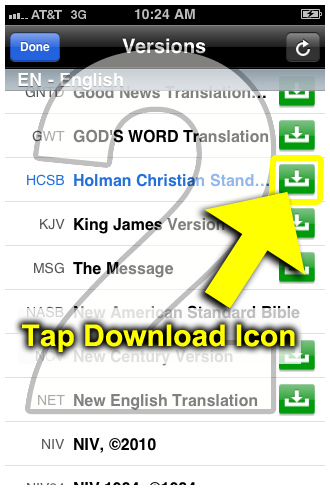
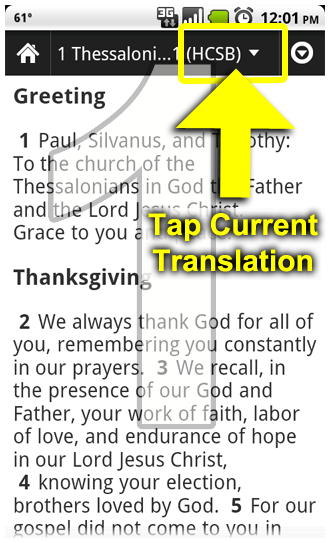
Make sure you’re connected to the Internet or to your service provider. Then, from the Bible reader:- Tap the top bar, where the current translation is presently displayed.
- All versions display in alphabetical order by language. Any translation with a download icon (a green box with a white arrow pointing downward) means it’s available as an offline version. Tap that version’s download icon.
- Follow the instructions and tap the large Download button.

Android:
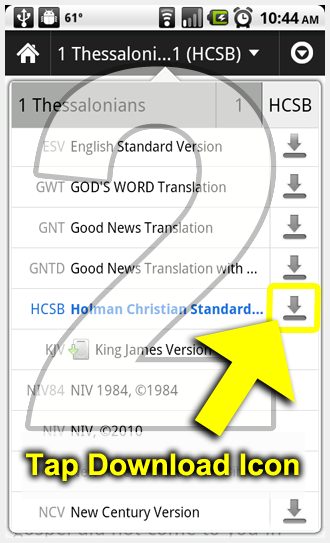
Make sure you’re connected to the Internet or to your service provider. Then, from the Bible reader:- Tap the box at the top right that displays the version short code.
- All available Bible versions display. Any translation with a download icon (an arrow pointing down) means it’s available as an offline version. Tap that version’s download icon.
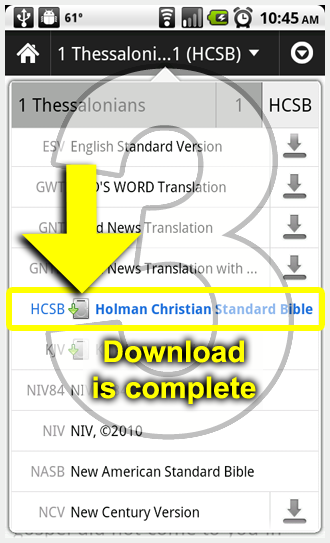
- After a few moments, a different icon displays next to the short code, indicating your download is complete.

Friday, February 11, 2011
1000 Free minutes for iPhone users
AT&T is continuing to say thank you to their iPhone users who are sticking with them. Last week was a 20% off an accessory coupon and this week is a free extra 1000 rollover minutes. Some readers have sent in screenshots of the above, let us know if you received one, too. Thanks, Vinod.
Update: We are hearing that if you did not recieve the text just send the word “yes” to the 11113020 number and you will recieve a text that says your account has been credited! Anyone want to verify?
Update 2: Confirmed below!
Update 3: There was some concern it was a scam but we’ve now verified it with AT&T – It’s legit.
LINK
Wednesday, August 4, 2010
Talk to Facebook friends for FREE on Vonage
I just found another reason to LOVE my iPhone! Vonage Facebook App!!
Everyone that has an iPhone/Android and Facebook MUST ABSOLUTELY install this app! Especially people like me.
Why I like:
- I'm on prepaid, so using my phone via Vonage does not cost me minutes
- My home got no cell phone coverage, but wifi always on
- I like almost all my 200 Facebook friends and don't ever mind them calling me
- You don't have to give out your real phone number
- Works with most countries, so no roaming charges
- It's FREE
Link: NewsFactor Network | Vonage Offers Free Mobile Calls for Facebook Friends
Vonage is getting into the mobile-apps game with a social-media twist, combining two of the tech industry's hottest trends with a new service for Facebook. The Vonage Mobile application lets users make free mobile calls to Facebook friends who also have the app.
Vonage customers can download the mobile app from the iTunes Store, Android Market, or the Vonage Facebook fan page. The software is free. Then users enter their Facebook ID and password. This only has to be done once.
The software automatically loads the user's Facebook contacts and groups them according to who can be called for free -- that is, those who have also downloaded the Vonage Mobile application for Facebook -- and which friends are available for instant messaging on Facebook.
Finally, the user can touch a friend's name from the Call Free list to make a free call. When the user places a call, the friend's profile picture and status update display on the screen. The phone will ring for incoming Vonage calls from Facebook friends, even if the app is closed.
The app also invites the user's friends who don't have the app to download it on the Vonage Facebook fan page. The service works over Wi-Fi as well as 3G and 4G networks in most countries and essentially eliminates traditional dialing.
Thursday, January 21, 2010
Dropbox - A must have for multiple computers

Do you have multiple computer at home? Or do you always take your work home with you on a jump drive? Or do you email yourself files so you can access from another computer? Your solution: Dropbox.
I recently started using Dropbox and it's great. I can upload/download files from my computer, laptop and iPhone. And I always know where the most up-to-date file is. It is fully integrated into my operating system, so it's just listed as another folder in my home folder. Other than the first time setting it up, there's no logging in, just instant access as if it was resident on your hard drive.
This cloud-computing service is a stripped down version of Apple's $99 MobileMe, but it's free for the first 2gb of storage. After that, it's $9.99/mo. for 50gb and $19.99 for $100gb.
Learn more about and download your Dropbox here: https://www.dropbox.com/tour
Thursday, December 31, 2009
Jailbreak your iPhone

This Christmas I gifted the wife and myself two unlocked iPhones, courtesy of friends who like to upgrade. An unlocked iPhone makes sense for us because we want all the features of the iPhone but want to stick to our prepaid plan with zero monthly charges. Sure, with the lack of a data plan, it's not always fun looking for a wifi hotspot, but when we think of the $30 (each) we save every month, we realize it's a luxury we rather not pay for.
Since we've received our phones, many many of you have come to me asking for advice on either jailbreaking their phone, or getting an unlocked one. Somehow, a waiting list for people who want me to find them a used iPhone has already formed... I was going to write a tutorial, but even better, I found a great all-you-need-to-know-about-iPhone post at Simon's iPhone Blog and pasted it below. I've learned a lot from Simon!
So far I've already easily unlocked three iPhones and jailbroken three iPod Touches for my
Have a Happy New Year!
Get to know your iPhone with iPhone Tips
- Download 10 Great Tips for iPhone
- iPhone 3GS Tip: Use Digital Compass with Google Maps
- How to Disable iPhone Battery Icon and Show Battery in Percentage
- iPhone Tip: How to Use Conditional Call Forwarding
- Get to Know the iPhone Headset Shortcuts
- iPhone Tip: Understand Connection Icons in Status Bar
- 10 Tips to Improve Your iPhone Battery Life
Interesting iPhone Apps to Try Out
- Dragon Search for iPhone Lets You Search with Voice and it’s Free
- Use WiFiPhoto To Transfer iPhone Photos to Computer Wirelessly
- Zosh: Sign Document Right On Your iPhone
- Running with iPhone 3GS and Nike+
- Adobe Brings Photoshop.com Mobile to iPhone
- LogMeIn: Remote Control Your PC or Mac from iPhone
- Facebook 3.0 for iPhone
Jailbreaking Your iPhone
You may heard of the term “Jailbreaking” for iPhone. But what does it mean? Check out the articles to learn more how jailbreaking can make the most out of your iPhone. [Note: Jailbreaking is not a must. So, do read through the article before you take the action.]
- Why jailbreak? Top 5 Reason for jailbreaking iPhone
- What’s the difference between jailbreaking and unlocking?
- Complete Guide: Jailbreak and Unlock iPhone 3G/3GS 3.1.2 Using Blackra1n & Blacksn0w
- Complete Guide: Jailbreak and Unlock iPhone 2G 3.1.2 Using Blackra1n
iPhone Jailbreak Tips
You already plan to jailbreak your iPhone but encounter some issues. Here are a few tips that may help you out.
- How to Fix: Notes App Does Not Save My Note After iPhone Jailbreak
- How to Secure Your Jailbroken iPhone From SSH Hack
- How to Fix DiskAid or iPhone Browser Issue After Blackra1n Jailbreak
- iPhone Tip: How to Change iPhone Carrier Name Using FakeCarrier
Interesting Apps & Themes for Jailbroken iPhone
Okay, now you have already jailbroken the iPhone. Check out some of the interesting apps from cydia and Winterboard to make your iPhone stand out from the crowd.
- Beautiful SnowFall Widget to Make Your iPhone Snow
- Never Miss this Great Winterboard Theme for iPhone – Acier
- Change iPhone SMS Background with Winterboard
- How to Install HTC Hero Theme on iPhone
- Another Great Winterboard Theme for iPhone – illumine
- BTstack Keyboard Hits the Cydia Store to Connect Bluetooth Keyboard and iPhone
- Download YouTube Video to iPhone with YourTube
Happy New Year! And enjoy your new phone and have a great start of 2010!
Wednesday, December 16, 2009
Operation Chokehold this Friday
It's coming. This Friday at noon. If you have trouble accessing your data, don't say I didn't warn you. And if you're participating, have fun. I wish I could join you. Unfortunately, I'm on T-Mobile.As an iPhone user, do you think it's a good idea? I'm curious to see what happens. But before you start feeling sorry for AT&T, keep in mind that they had $40 billion in revenues and $10 billion in profits just in the last nine months. I think they SHOULD invest a bit more in their network. Heck, I still can't get a cell phone signal at my house! HELLO!!!!
From Fake Steve:
On Friday, December 18, at noon Pacific time, we will attempt to overwhelm the AT&T data network and bring it to its knees. The goal is to have every iPhone user (or as many as we can) turn on a data intensive app and run that app for one solid hour. Send the message to AT&T that we are sick of their substandard network and sick of their abusive comments. THe idea is we’ll create a digital flash mob. We’re calling it in Operation Chokehold. Join us and speak truth to power!
From the Operation Chokehold website:
iPhone users in the United States are frustrated. We love our phones, but we hate the service. Dropped calls. Slow data. No data at all. No service at all. For some people, it's an everyday occurrence.
Dan Lyons, known to many as Fake Steve Jobs has come up with a simple solution: Show AT&T that we want change. In his description of Operation Chokehold, he encourages iPhone users around the country to overwhelm AT&T with data requests and bring down their 3G network.
Why? Because AT&T isn't doing anything about the problem...yet. They're continuing to provide us with bad service (which they have done little or nothing to improve), refuse to provide us with tethering (a service that almost every other carrier in the world does for free), and threaten to impose fines on users who actually make use of their service.
For those of us who use iPhones and rely on AT&T, we've had enough. It's time to show AT&T that it's time to suck it up and improve their stupid network.
Many people have complained about this campaign already, claiming that they need cell service in the case of an emergency or other need. Our response? Use a landline phone, or another carrier's phone. Those things still exist, right? AT&T calls us irresponsible, but in reality, it's them who have been irresponsible about the service that we pay them for.