Saturday, February 12, 2011

Free NIV Bible download for iPhone and Android

LINK


2011 marks the 400th anniversary of the publication of the King James Version (KJV) of the Bible. To commemorate this milestone achievement, which made the Bible available in the common language of the people, throughout 2011, YouVersion will roll out events and opportunities that will help you more easily access, engage and share the Bible. The first of these events is that Bible App™ users will be able to download the New International Version (NIV) of the Bible. Made possible through a special partnership with Biblica and Zondervan, this offer will only be available for a limited time.

Beginning THIS SATURDAY, February 12, at 8:00 PM U.S. Eastern Time (GMT-5), and lasting for 400 hours, you’ll be able to download the NIV to your iPhone, iPad, iPod touch, or Android device. When you download the NIV, that means you’ll be able to read it even when you can’t connect to your service provider or to the Internet. This special promotion will end on March 1, at 12:00 PM noon U.S. Eastern Time (GMT-5).

Downloading offline versions:

When the NIV becomes available on Saturday, here’s how you’ll be able to get yours:

iPhone/iPad/iPod touch:

Make sure you’re connected to the Internet or to your service provider. Then, from the Bible reader:
  1. Tap the top bar, where the current translation is presently displayed.
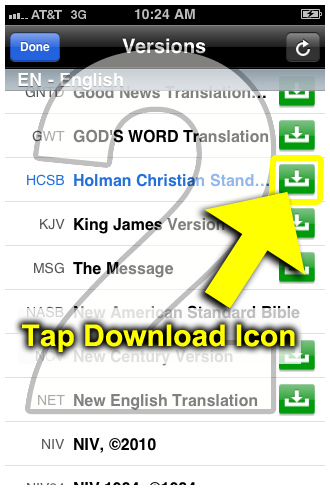
  2. All versions display in alphabetical order by language. Any translation with a download icon (a green box with a white arrow pointing downward) means it’s available as an offline version. Tap that version’s download icon.
  3. Follow the instructions and tap the large Download button.
1. Tap current translation 2. Tap download icon3. Tap Download button

Android:

Make sure you’re connected to the Internet or to your service provider. Then, from the Bible reader:
  1. Tap the box at the top right that displays the version short code.
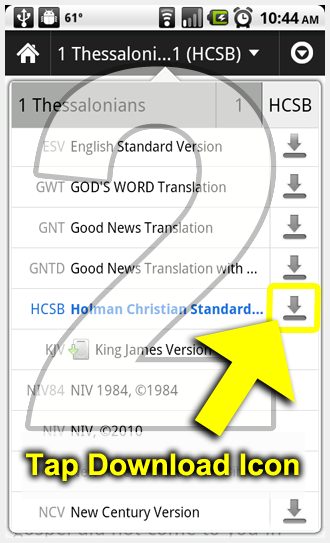
  2. All available Bible versions display. Any translation with a download icon (an arrow pointing down) means it’s available as an offline version. Tap that version’s download icon.
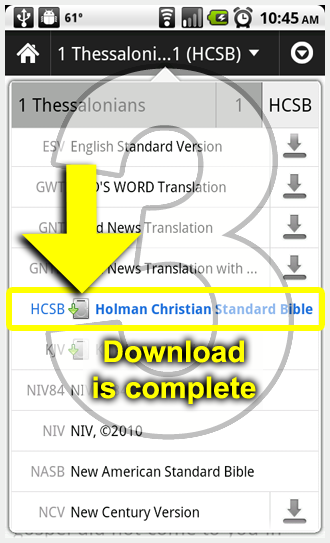
  3. After a few moments, a different icon displays next to the short code, indicating your download is complete.
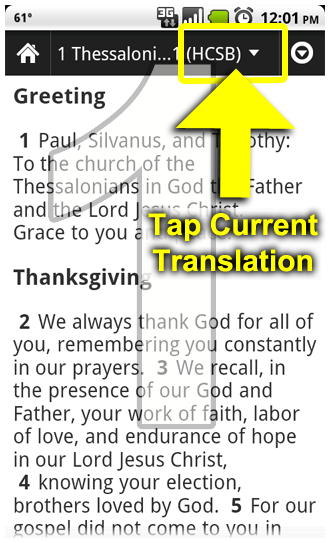
1. Tap current translation2. Tap download icon3 Download is complete

Friday, February 11, 2011

1000 Free minutes for iPhone users


AT&T is continuing to say thank you to their iPhone users who are sticking with them. Last week was a 20% off an accessory coupon and this week is a free extra 1000 rollover minutes. Some readers have sent in screenshots of the above, let us know if you received one, too. Thanks, Vinod.
Update: We are hearing that if you did not recieve the text just send the word “yes” to the 11113020 number and you will recieve a text that says your account has been credited!  Anyone want to verify?
Update 2: Confirmed below!
Update 3: There was some concern it was a scam but we’ve now verified it with AT&T – It’s legit.


LINK

He shoots. He scores! 11/11/11

If you're a numbers person set on having a baby with a 11-11-11 birth date, today is the day to get started. (Or, you know, this weekend. These things aren't timed too specifically.)


Personally I know of a couple that have 01-01-11 as their special number. So I KNOW they'll be rethinking their weekend plans. Hopefully she'll call me tomorrow to cancel the piano lesson :)

LINK

Tuesday, February 8, 2011

Back to Twain Harte

Last weekend we went back to Twain Harte for our now annual snow vacation. We stayed at the same cabin as last year but with two different families. The Maks and Trans both have recent new additions to their families so they had to sit out this time. But they definitely plan to be there next year.

We originally planned to go on President's weekend, but it was booked. And good thing, because there was hardly any snow left around the cabin. The lack of rain in January caused most of the snow to melt. Fortunately, the main snow hill still had enough to sled on, whew! I feel sorry for those people coming later this month when that hill dries up. Boy will they be disappointed!

More big kids this year, so a lot more sledding.

All smiles before attempting the big snow hill for the first time.

Last year, there were about 20 people here. This year, just us.

 You can ask my wife what she "took a big ol'..." of.

A new play area they discovered. What's with kids and water?

 We found this abandoned bunker. I dared them to see if there was a body in there.

60 degree weather and beautiful surroundings.

She's a big girl now and can sled on her own (frees up daddy to do his own thing).

When staying at a cabin with friends, it's really all about the junkfood.

On the last day, the hill was icy and super fast! And it had noticeably less snow.

Um, so what do you expect from a family of Asian female drivers?

It's like that Haunted Mansion ride at Disneyland...
There's a ghoul sitting behind you the whole time and you don't even know.


No injuries and we all still mostly remain friends :) We got home by 10 p.m. Sunday.

We're already looking forward to next season where we'll hopefully get two cabins and six families. We may even go twice. Better reserve your spot soon!

Friday, February 4, 2011

Oakland Crimespotting


If you're like me, you've long moved out of Oakland but your roots are still there. Whether it be your parent's house, your church, or your job, you find yourself in Oakland at least once a week. You wish Oakland was still the way it used to be growing up, but times have changed and it's hard to deny that even the "safer" parts of Oakland are no longer immune to crime.

Oakland Crimespotting is an informative interactive website on all the crime reports in Oakland. For the past year, I've been tracking the crime around my old house and it's pretty scary! I cringe when I read about the activities in my former backyard: burglary-forcible entry, carjacking-strong arm, assault, robbery-firearm, battery, etc. Wow.

On any given day/week, the map is just littered with colored spots indicating how much evil is lurking throughout the city. For those of us living in the suburbs, it's quite an eye-opener seeing so many colored spots daily. But then again, even in our own perceived, safe neighborhoods, I'm sure crimes are committed everyday also, but those are usually just theft and vandalism (non-violent). Also, we have the luxury of not knowing about them.

In 2010, there were 90 murders in Oakland. That's a decrease from the 120 in 2007, but still way too high. But it's not just the murders that scare me, it's the other assault, robbery and crimes of opportunities that has me on high alert at all times. Knowing that at any intersection, some gangbanger can blow through a red light and plow into you (yes, that happened to my friend on her way to her mom's house), that gives me reason to avoid the city as much as possible.

Just last month, three people were charged with 132 felony counts including TWO DOZEN home invasion robberies "targeting mostly immigrant families of Asian descent." Two happened on Wisconsin and Delaware streets, which is above MacArthur Blvd, the psychological border that separates the good from the not-so-good.

It's a given that Asians are targeted because we tend to be weak and carry a lot of cash/gadgets. Last year there were a few high profile cases involving black on Asian hate crimes. So it's hard not to assume the worst when seeing a group of ghetto teens with saggy pants and hoodies. That's why I avoid public parts of Oakland at night, even Chinatown. Even if I find a killer deal on Craigslist after dinner, it'll have to wait until the next day.

Below I've listed a few neighborhoods that my readers may have interest in. The easiest way to follow the action is to subscribe to the RSS feed.

Chinatown: 3X

Dimond/Upper Fruitvale: 22X

Coolidge to Crestmont: 22Y

Upper High Street: 25X

Montclair: 13Z

China Hill/Haddon: 15X

For those of you new to Oakland, let me just tell you a few streets to stay away from, especially at night: San Pablo, Seminary, 73rd, International, Foothill, Martin Luther King, anything below MacArthur, and any area around the Coliseum or a BART station.

Stay safe my friends.

Thursday, February 3, 2011

How To Use Multiple iTunes Libraries on a Single Computer

From Simon Blog

Chances are that you need to share your computer with other family members. Apparently you do not want to share your own iTunes library with others. You want to keep your own library and create a new one for other users.

There is a hidden feature that you may not know. iTunes does allow you to create separate library for individual user. Just hold down the Option key (for Mac user) / Alt key (for Windows user) each time you launch iTunes. You’ll then be prompted with options to create a new iTunes library or choose an existing iTunes library.

Let’s say you’re now sharing the computer with your mum and dad. Simply select the “Create Library…” option and create a new library for your mum. Do the same procedures again to create the library for your dad as well.

Later when your dad needs to use iTunes, tell him to hold down the option key (for Mac) or Alt key (for Windows) when launching iTunes. Then select the “Choose Library…” option and select his own iTunes library folder.


By using this technique, each of you can keep music, movies or apps in a separate iTunes library. You can have a complete control of your own library. You can add/delete music or sync your iPhone without affecting other’s iTunes library.

But please note that this method only works on iTunes 9.2 or up. It’s time to upgrade if you’re still using older version.